Grade 2 Coding: Sequential and Concurrent Events Through Play
Grade 2 coding builds on Grade 1’s step-by-step sequences by adding a new idea: concurrent events, where two or more things happen at the same time. In the Ontario curriculum, Grade 2 students solve problems and create computational representations by writing and executing code that involves sequential and concurrent events, and they read and change existing code to see how the changes affect the outcomes.
Picture two cartoon characters on a screen: one dances while the other sings, at the same moment. That’s concurrency. Kids see it in video games, cartoons and real life all the time, and Grade 2 coding helps them describe and create it.
This guide explains Grade 2 coding in plain language, the difference between sequential and concurrent events, eight fun activities (unplugged and on screen), how to use ScratchJr, debugging tips, common mistakes and how coding grows in Grade 3.
Quick Answer
Grade 2 coding teaches children to write, read and change code with sequential events (steps in order) and concurrent events (actions happening at the same time). Kids practice with unplugged coding activities, grid games and free tools like ScratchJr, where two characters can run their own code simultaneously. Debugging, finding and fixing mistakes, is a key skill.
Key Takeaways
- Grade 2 coding adds concurrent events to sequential events.
- Concurrent events are actions that happen at the same time.
- Unplugged activities and ScratchJr both work well for Grade 2.
- Debugging builds persistence and logical thinking.
- Coding is part of the Algebra strand in Ontario math.
Table of Contents
- What Is Grade 2 Coding in Ontario Math?
- Why Is Grade 2 Coding Part of Math?
- How Do Kids Learn Grade 2 Coding Step by Step?
- 8 Fun Grade 2 Coding Activities for Sequences and Events
- What Is the Difference Between Sequential and Concurrent Events?
- How Can Kids Use ScratchJr for Grade 2 Coding?
- How Does Grade 2 Coding Connect to Math Problems?
- Is Coding Taught the Same Way Across Canada?
- What Should Parents Say During Coding Activities?
- What Do Teachers Wish Parents Knew About Grade 2 Coding?
- How Can Everyday Life Show Concurrent Events?
- How Can You Adapt Coding for Different Learners?
- What Does a 4-Week Coding Plan Look Like?
- Try It: 8 Grade 2 Coding Practice Questions
- What Are Common Grade 2 Coding Mistakes?
- How Do You Know Your Child Understands Grade 2 Coding?
- Where Does Grade 2 Coding Lead?
- Frequently Asked Questions About Grade 2 Coding
- Conclusion: Two Things at Once, One Big Idea
What Is Grade 2 Coding in Ontario Math?
Grade 2 coding is writing and running simple code to solve problems or represent math situations, with a focus on sequential and concurrent events. In Ontario, coding is part of the Algebra strand of the math curriculum, not a separate subject.
The Ontario mathematics curriculum includes two Grade 2 coding expectations:
- Solve problems and create computational representations of mathematical situations by writing and executing code, including code that involves sequential and concurrent events.
- Read and alter existing code, including code that involves sequential and concurrent events, and describe how changes to the code affect the outcomes.
Sequential Events
Sequential events happen one after another: step forward, turn left, step forward. Order matters.
Concurrent Events Coding
Concurrent events happen at the same time. In ScratchJr, two characters can each have their own code that starts with the same green flag, so they move simultaneously. Unplugged, two children can follow two different sets of instructions at once.
The Ontario Coding Curriculum Across Grades
The Ontario coding curriculum builds year by year: sequential events in Grade 1, sequential and concurrent events in Grade 2, and repeating events (loops) in Grade 3.

Why Is Grade 2 Coding Part of Math?
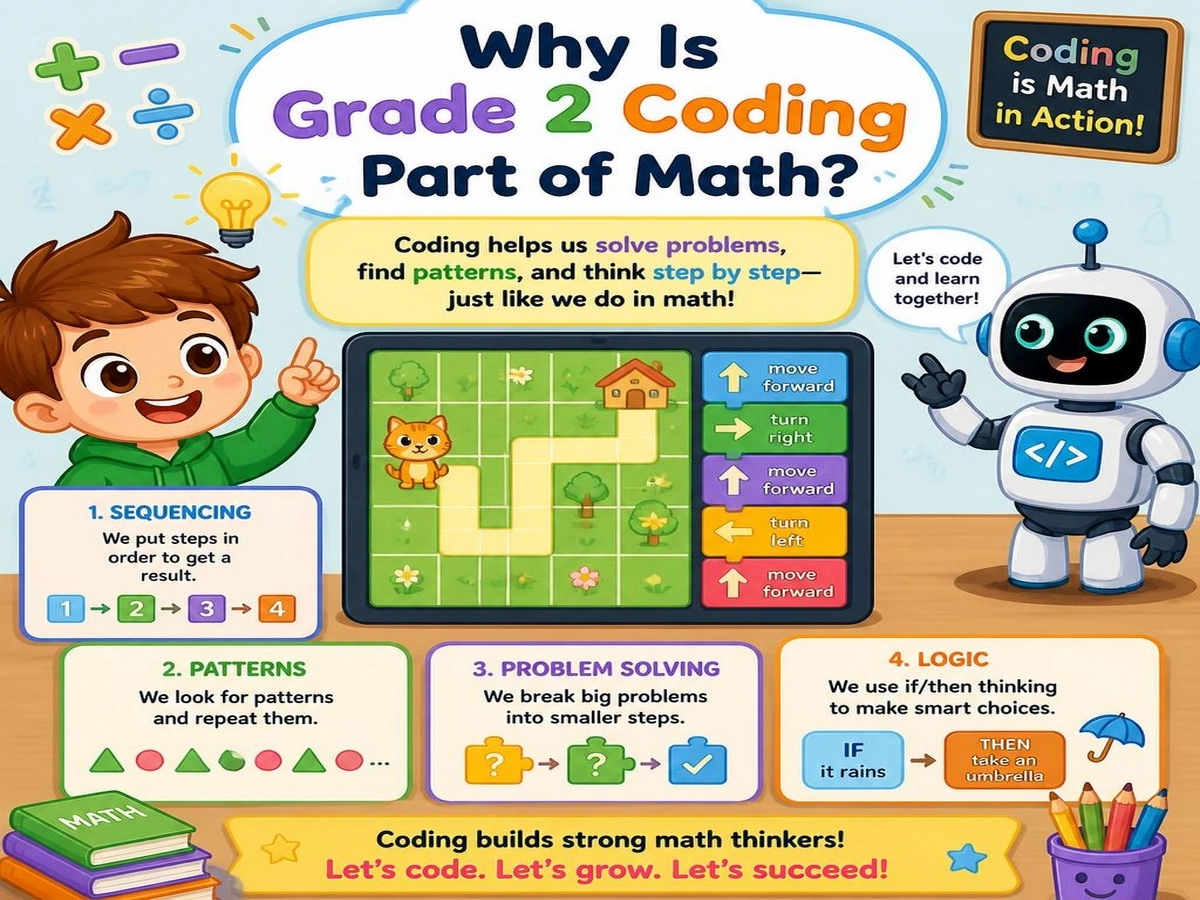
Grade 2 coding is part of math because it develops logical reasoning, sequencing, patterning, spatial sense and problem solving. Writing code requires precise thinking, which is exactly what mathematics demands.
- Sequencing. Order matters, just like steps in a calculation.
- Patterns. Repeated steps are patterns.
- Spatial sense. Moving characters on grids uses positional language.
- Precision. Code must be exact.
- Debugging. Finding errors builds persistence and checking habits.
Coding also offers a safe place to make mistakes. In code, bugs are expected. That mindset transfers to math: an error is something to find and fix, not something to fear.
How Do Kids Learn Grade 2 Coding Step by Step?
Kids learn Grade 2 coding by reviewing sequential code, adding a second character or person, running two sequences at once, predicting what will happen, debugging and changing code to get new outcomes.
- Review sequences. Write a 4-step path on a grid.
- Add a second character. Give each its own code.
- Run both at once. Watch them move together.
- Predict. “Will they bump into each other?”
- Debug. Fix code that doesn’t work.
- Alter. Change one step and see what happens.
Expert Tip
Before running any code, ask your child to predict the result. Comparing predictions with outcomes is where most coding learning happens.
InukMath’s Grade 2 introductory coding lesson introduces sequences and events with friendly visuals.

8 Fun Grade 2 Coding Activities for Sequences and Events
These eight coding activities for kids cover sequential and concurrent events, both unplugged and on screen.

1. Two Robots
Two family members are robots. Each gets a different set of arrow cards. Say “Go!” and both run their code at the same time. Do they reach their targets?
2. Grid Race
Draw a grid. Two toy cars each follow their own code at the same time, one step per beat. Which arrives first?
3. Dance Code Duet
Write two dance sequences, one for each dancer, to perform at the same time. Change one step and watch the duet change.
4. Kitchen Code
Two concurrent tasks: one person stirs while another pours. Write both codes and “run” them together.
5. ScratchJr Characters
In ScratchJr, give two characters their own code, each starting with the green flag. Watch them move at the same time.
6. Bug Hunt
Write code with a mistake. The robot ends up in the wrong place. Find and fix the bug.
7. Predict and Alter
Show a code. Predict where the character ends. Change one step. Predict again.
8. Code.org Puzzles
Code.org offers free, age-appropriate puzzles with sequences and events for early learners.
What Is the Difference Between Sequential and Concurrent Events?
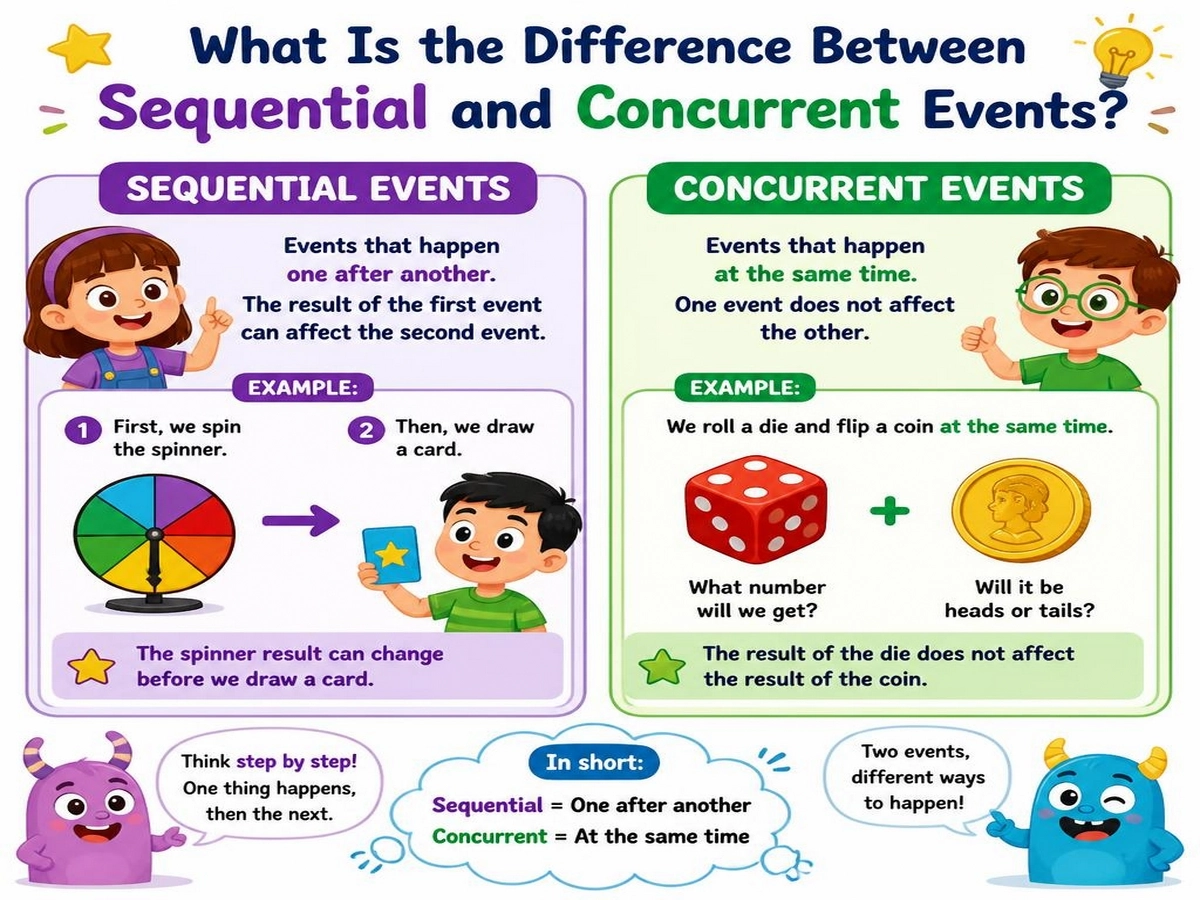
Sequential events happen one after another in a set order, while concurrent events happen at the same time. Sequential code tells one character what to do step by step; concurrent code runs separate sequences together.
| Feature | Sequential events | Concurrent events |
|---|---|---|
| Timing | One after another | At the same time |
| Example | Walk, turn, jump | Cat walks while dog barks |
| Grade introduced (Ontario) | Grade 1 | Grade 2 |
| Real-life example | Brushing teeth steps | Singing and clapping together |
| Key question | “What happens next?” | “What happens at the same time?” |
Concurrent Events in Real Life
Concurrency is everywhere: traffic lights at different corners changing at once, a band where each instrument plays its own part, or a family dinner where one person sets the table while another serves. Pointing these out helps children understand the idea.
How Can Kids Use Scratchers for Grade 2 Coding?
ScratchJr for kids is a free app designed for ages 5 to 7, developed by the MIT Media Lab and Tufts University’s DevTech Research Group. Children snap picture blocks together to make characters move, speak and interact. It’s ideal for exploring concurrent events because each character can have its own code triggered by the same green flag.
Getting started with ScratchJr:
- Choose a background and two characters.
- Give each character a “start on green flag” block.
- Add movement blocks to each character.
- Tap the green flag. Both characters move at once.
- Change one character’s code and run it again.
Keep sessions short and purposeful. The Canadian Paediatric Society recommends a family media plan and prioritizing educational, interactive content for school-aged children.

How Does Grade 2 Coding Connect to Math Problems?
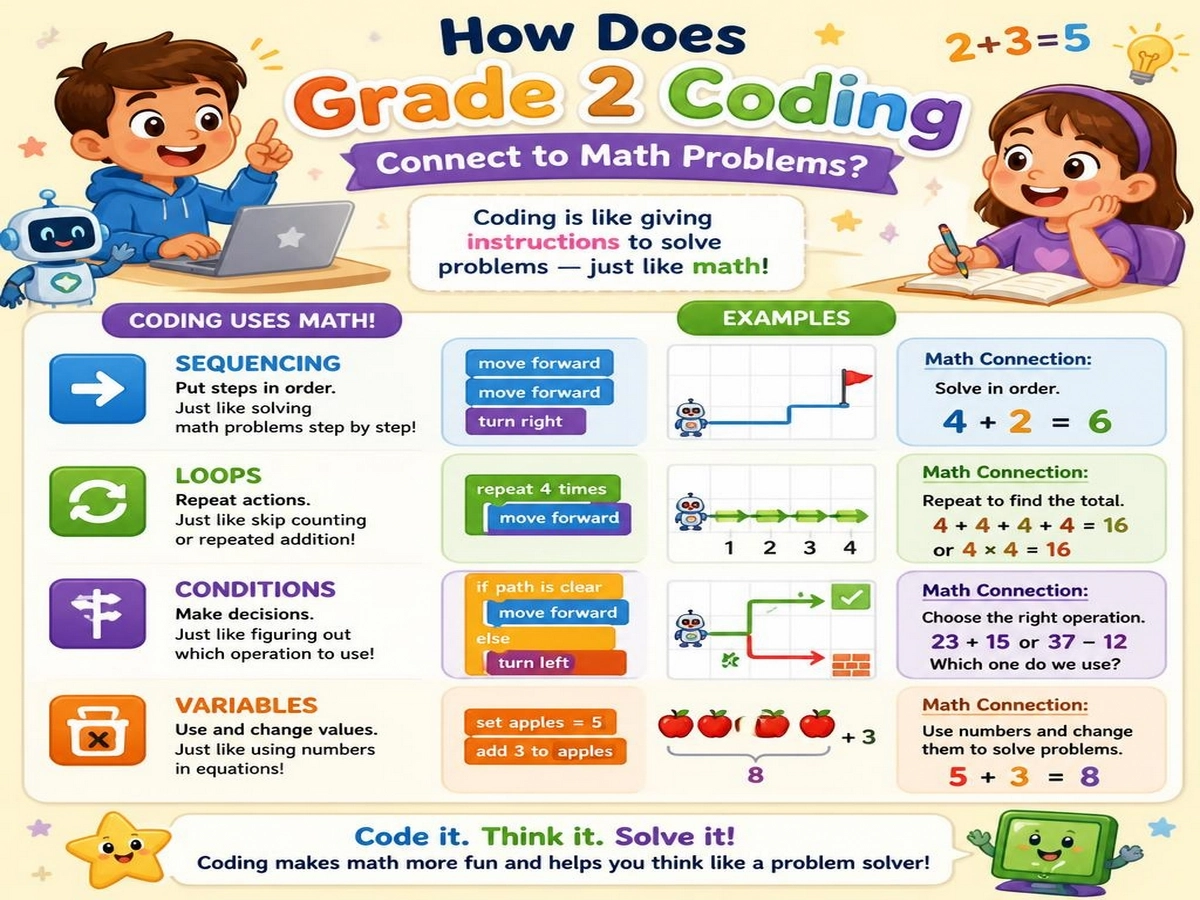
Grade 2 coding connects to math problems because code can represent math situations. When children program a character to move along a number line or a grid, they’re using counting, distance and position in a new way.
- Number line code: “Move forward 5, then forward 3. Where does the character land?” That’s 5 + 3.
- Grid code: “Move 2 right and 3 up.” That’s coordinates and positional language.
- Concurrent counting: two characters count by 2s and 5s at the same time. When do they land on the same number?
- Patterns: a character repeats “hop, hop, spin,” which is a repeating pattern.
These activities show children that coding isn’t separate from math; it’s another way to explore it. They also prepare kids for Grade 3, when repeating events turn patterns into loops.
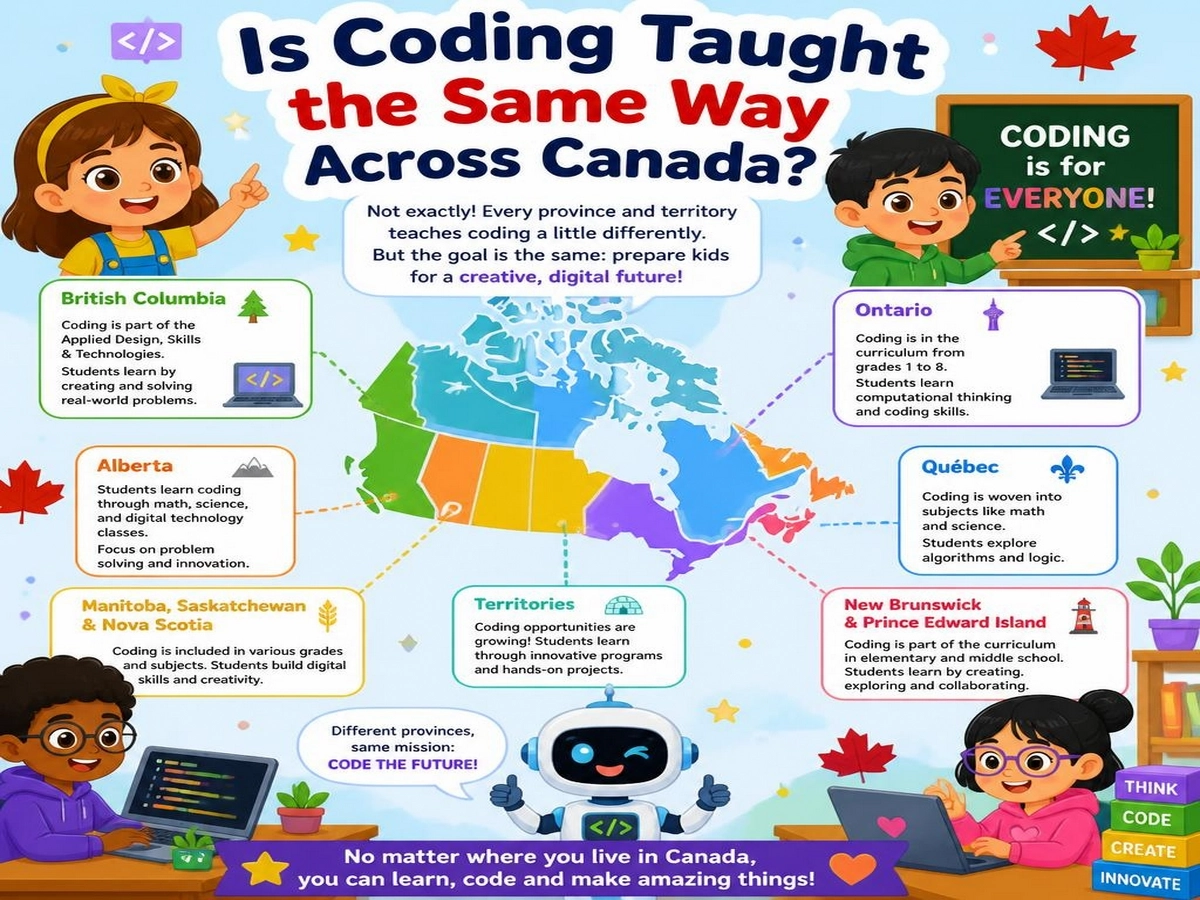
Is Coding Taught the Same Way Across Canada?
Coding is not taught the same way across Canada. Ontario includes coding in the math curriculum from Grade 1 to Grade 8, while other provinces place computational thinking in technology, science or applied design curricula.
- Ontario: coding in math, with concurrent events in Grade 2.
- British Columbia: computational thinking within Applied Design, Skills and Technologies.
- Other provinces: coding through digital literacy, science or optional programs.
Grade 2 coding skills, sequencing, precision and debugging, transfer easily to any program, wherever your child goes to school.
What Should Parents Say During Coding Activities?
Use these prompts during Grade 2 coding.
- “What do you think will happen?”
- “Which steps happen at the same time?”
- “Where’s the bug? How can we fix it?”
- “What happens if we change this step?”
- “Can you make both characters finish at the same time?”
What Do Teachers Wish Parents Knew About Grade 2 Coding?
Teachers often wish parents knew that Grade 2 coding doesn’t require technical skills. Unplugged games teach the same thinking as apps, and debugging matters more than getting it right the first time.
- Unplugged counts. Screen-free coding is real coding.
- Predict first. Predictions build reasoning.
- Celebrate bugs. Mistakes are learning opportunities.
- Connect to math. Grids, patterns and positions are math skills.
A Quick Story
Two siblings program their parents as robots to “meet in the middle” of the living room. Mom’s code works; Dad walks into the couch. “Bug!” they shout, laughing. They add a “turn left” and try again. Both parents meet in the middle at the same time. The kids just debugged concurrent code, and they want to do it again.
How Can Everyday Life Show Concurrent Events?
Everyday life is full of concurrent events, which makes Grade 2 coding easy to connect to real experiences.
- Cooking: pasta boils while sauce simmers.
- Music: drums and guitar play together.
- Sports: players run different routes at the same time.
- Traffic: lights change while cars wait.
- Family routines: one person washes, another dries.
How Can You Adapt Coding for Different Learners?
Adapt Grade 2 coding activities for each child.
Active Learners
Human robots and dance codes.
Visual Learners
ScratchJr and arrow cards with colors.
Learners Who Need More Time
Practice sequential code with one character before adding a second.
Learners Ready for More
Make characters interact, add timing (wait blocks) or explore Code.org puzzles with repeat blocks as a preview of Grade 3.
What Does a 4-Week Coding Plan Look Like?
A 4-week Grade 2 coding plan builds from sequences to concurrency to debugging.
| Week | Focus | Activities | Goal by Friday |
|---|---|---|---|
| 1 | Sequential review | Grid paths, arrow cards | Writes a 5-step sequence |
| 2 | Concurrent events unplugged | Two Robots, Dance Code Duet | Runs two codes at once |
| 3 | ScratchJr | Two characters, green flag | Programs two characters |
| 4 | Debugging and altering | Bug Hunt, Predict and Alter | Finds and fixes bugs |
Try It: 8 Grade 2 Coding Practice Questions
Use a 4-by-4 grid. Answers follow.
- Code: forward, forward, turn right, forward. How many moves forward?
- Two robots start together. Robot A: forward 3. Robot B: forward 2. Who finishes first?
- What’s the difference between sequential and concurrent events?
- Find the bug: the robot needs to go 3 squares up but the code says forward, forward.
- In ScratchJr, how do you make two characters start at the same time?
- Change “turn left” to “turn right.” Will the robot end up in the same place?
- Name a real-life concurrent event.
- Put in order: open door, walk in, close door.
Answers: 1) 3; 2) Robot B (fewer steps); 3) sequential happen one after another, concurrent happen at the same time; 4) add one more forward; 5) give both a green flag start block; 6) no, it will go a different direction; 7) any example, like singing while clapping; 8) open door, walk in, close door.
Myths vs. Facts About Grade 2 Coding
| Myth | Fact |
|---|---|
| Coding needs a computer. | Unplugged coding builds the same skills. |
| Concurrent events are too advanced for Grade 2. | Kids see them daily and understand them quickly. |
| Bugs mean failure. | Debugging is a core skill. |
| Coding is separate from math. | In Ontario, coding is in the math curriculum. |
What Are Common Grade 2 Coding Mistakes?
Common Grade 2 coding mistakes include mixing up left and right, forgetting that turns don’t move characters, starting characters at different times and not predicting before running.
- Left/right mix-ups. Use a wristband.
- Turns don’t move. Practice turns separately.
- Different start times. Use the same trigger for concurrency.
- No predictions. Always predict first.
- Giving up on bugs. Celebrate debugging.
Common Mistake
Fixing your child’s code for them. Let them find the bug, even if it takes a few tries. Debugging is where the learning happens.
How Do You Know Your Child Understands Grade 2 Coding?
Your child understands Grade 2 coding when they can write sequential code, run two codes at the same time, explain concurrent events, debug simple code and predict how changes affect outcomes.
Checklist
- Writes a sequential code for a path
- Runs two codes concurrently
- Explains sequential vs. concurrent events
- Finds and fixes a bug
- Predicts how a code change affects the result
Where Does Grade 2 Coding Lead?
Grade 2 coding leads to Grade 3 coding with repeating events (loops), more complex debugging and coding to represent math situations.
- Grade 1 roots: Grade 1 coding.
- Grade 2 connections: patterning and location and movement.
- Grade 3: Grade 3 coding.
Future Trends
Coding tools for young children keep improving, with more robotics kits and block-based apps in Canadian classrooms. The core skills of sequencing, concurrency and debugging remain the foundation.
Frequently Asked Questions About Grade 2 Coding
What is Grade 2 coding in Ontario?
Writing, reading and changing code with sequential and concurrent events, as part of the math curriculum.
What are concurrent events in coding?
Actions that happen at the same time, like two characters moving together.
What is ScratchJr for kids?
A free app for ages 5 to 7 where children snap blocks together to make characters move and interact.
Do Grade 2 kids need a tablet for coding?
No. Unplugged activities teach the same skills, though apps like ScratchJr are a great addition.
What are good coding activities for kids in Grade 2?
Two Robots, Grid Race, Dance Code Duet, Bug Hunt and ScratchJr projects.
What is debugging?
Finding and fixing mistakes in code.
How does coding connect to math?
It builds sequencing, patterns, spatial sense and precise reasoning.
How much screen time is okay for coding?
Short, purposeful sessions of 10 to 15 minutes, balanced with unplugged activities.
What comes after Grade 2 coding?
Grade 3 adds repeating events (loops) and more complex debugging.
Conclusion: Two Things at Once, One Big Idea
Grade 2 coding helps children understand that code can make things happen in order and at the same time. Practice with human robots, grid races, dance duets and ScratchJr, always predict before running and celebrate every bug found. These skills build logical thinking that supports math and beyond.
Explore the full year in our Canadian Grade 2 math guide, and see how coding grows across grades in our Canadian math practice roadmap.
Start coding the fun way. InukMath offers free Grade 2 lessons and practice that connect coding to math. Join free and explore our Grade 2 games.